

Estimated time: 5 minutes. You will need Iru Admin access to your tenant and the ability to create API tokens.
Prerequisites
- An Iru tenant (US or EU) with admin access to Settings → Access
- Your tenant API host — for example
acme.api.kandji.io(US) oracme.api.eu.kandji.io(EU) - A Clarion workspace with the Iru integration page open
Step 1 — Create an API token in Iru
- Sign in to your Iru tenant as an admin.
- Go to Settings → Access.
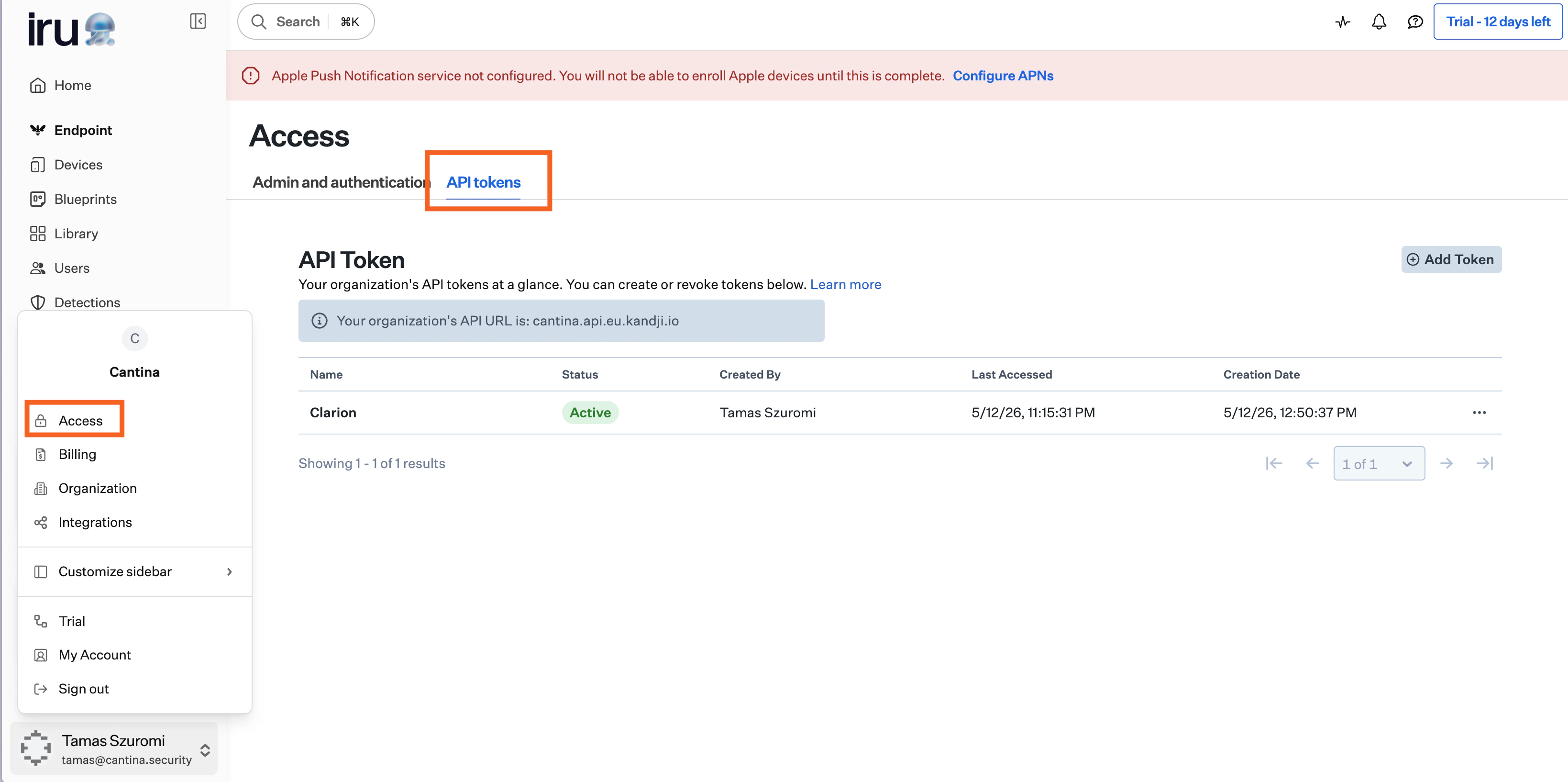
- Click Add API Token.
- Copy the generated API token.
- Configure permissions.
- Grant the token the following read permissions:
- Devices (required) — list devices, fetch device details, activity, status, and installed apps
- Users (required) — look up users by email or ID
- Prism (required) — inventory queries for device information, launch agents/daemons, local users, and applications
Devices (read) is also what powers device discovery into the Brain — keep it granted so Clarion can sync your device fleet.
- Grant the token the following write permissions under Device Actions:
- Daily Check-In — trigger an immediate MDM check-in to refresh device state
- Lock Device — remotely lock a managed device
- Update Location — request the device’s current location
Step 2 — Enter credentials in Clarion
- In Clarion, open Integrations and find Iru under device management.
-
Enter your tenant API URL:
- US tenants:
acme.api.kandji.io - EU tenants:
acme.api.eu.kandji.io
https://URL — Clarion parses out the subdomain and region automatically. - US tenants:
- Paste the API token from Iru.
- Click Connect.
/users endpoint before saving. If the token is invalid or the URL is wrong, you’ll see a clear error and nothing is persisted.
What agents can do
Once connected, agents on this workspace gain access to the/iru action, which exposes a curated set of read-only Iru tools:
Device discovery into the Brain
Beyond on-demand agent lookups, Clarion discovers your device fleet into the Brain as device assets (name, model, platform, OS version, serial number, last check-in). When a device’s assigned user matches a synced identity (Okta / Google Workspace), the device is linked to its owner — so an issue involving that user surfaces their devices as related assets. Devices refresh on each asset sync (the manual Sync action or the scheduled auto-update). No extra configuration is needed beyond the Devices read permission granted above.Disconnect
To remove the integration:- In Clarion, open Integrations → Iru.
- Click Disconnect.
/iru action, and any saved skills that reference it will surface the integration as missing until you reconnect.
Troubleshooting
”Iru returned 404 for tenant”
The tenant subdomain or region is wrong. Double-check the API host in Iru → Settings → Access:- US tenants use
*.api.kandji.io. - EU tenants use
*.api.eu.kandji.io.
acme) must match the prefix shown in your Iru admin URL.