> ## Documentation Index
> Fetch the complete documentation index at: https://docs.clarion.cantina.xyz/llms.txt
> Use this file to discover all available pages before exploring further.
# Iru
> Connect Iru to Clarion so agents can look up devices, users, applications, and vulnerabilities from your Iru tenant during alert triage.
This guide walks you through connecting your Iru tenant to Clarion. Once connected, Clarion agents can call Iru's REST API on your behalf to enrich investigations with device, user, application, and vulnerability data.
**Estimated time:** 5 minutes. You will need **Iru Admin** access to your tenant and the ability to create API tokens.
## Prerequisites
* An **Iru** tenant (US or EU) with admin access to **Settings → Access**
* Your tenant API host — for example `acme.api.kandji.io` (US) or `acme.api.eu.kandji.io` (EU)
* A **Clarion workspace** with the Iru integration page open
***
## Step 1 — Create an API token in Iru
1. Sign in to your **Iru** tenant as an admin.
2. Go to **Settings → Access**.
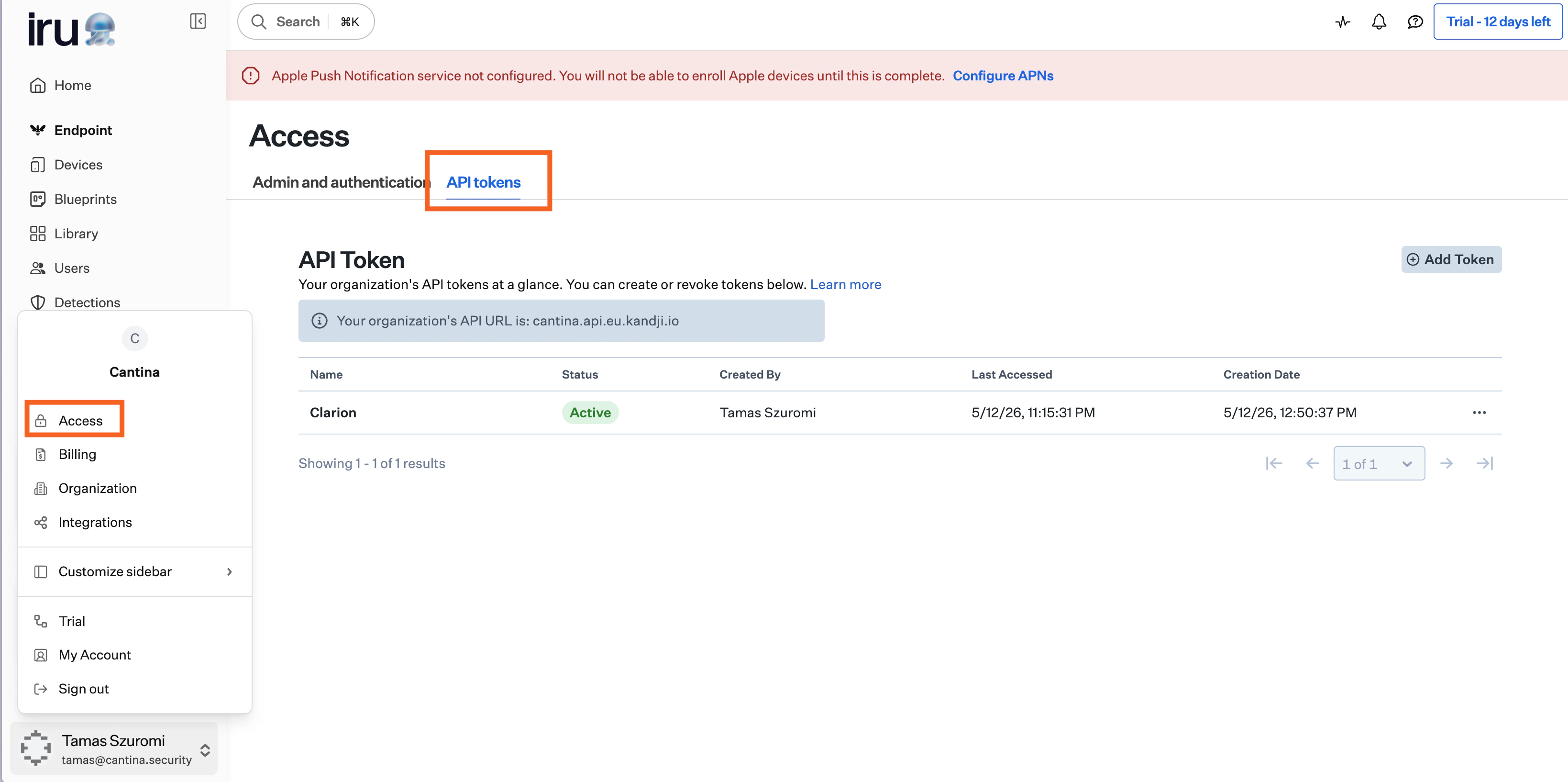 3. Click **Add API Token**.
4. Copy the generated **API token**.
Copy the API token immediately — Iru only shows it once. Store it securely. Avoid tying the token to an admin account that may be removed; consider a dedicated service admin.
5. **Configure permissions.**
6. Grant the token the following **read** permissions:
* **Devices** (required) — list devices, fetch device details, activity, status, and installed apps
* **Users** (required) — look up users by email or ID
* **Prism** (required) — inventory queries for device information, launch agents/daemons, local users, and applications
7. Grant the token the following **write** permissions under **Device Actions**:
* **Daily Check-In** — trigger an immediate MDM check-in to refresh device state
* **Lock Device** — remotely lock a managed device
* **Update Location** — request the device's current location
***
## Step 2 — Enter credentials in Clarion
1. In Clarion, open **Integrations** and find **Iru** under device management.
2. Enter your tenant **API URL**:
* US tenants: `acme.api.kandji.io`
* EU tenants: `acme.api.eu.kandji.io`
You can paste the bare hostname or a full `https://` URL — Clarion parses out the subdomain and region automatically.
3. Paste the **API token** from Iru.
4. Click **Connect**.
Clarion verifies the token by calling Iru's `/users` endpoint before saving. If the token is invalid or the URL is wrong, you'll see a clear error and nothing is persisted.
***
## What agents can do
Once connected, agents on this workspace gain access to the `/iru` action, which exposes a curated set of read-only Iru tools:
| Tool | What it returns |
| -------------------------------------------- | -------------------------------------------------------------------------------------- |
| `list_devices` | Device summaries, optionally filtered by platform (`mac`, `iphone`, `ipad`, `appletv`) |
| `get_device_details` | Full device record — general info, hardware, network, MDM state |
| `find_devices_for_user` | Devices assigned to a given email address |
| `get_user` / `get_user_by_id` / `list_users` | Iru user lookups |
| `list_vulnerabilities` | CVEs detected on a specific device |
| `get_device_status` | Blueprint and library-item status for a device |
| `get_device_activity` | Recent activity/event stream for a device |
| `list_device_apps` | Applications installed on a single device |
| `list_audit_events` | Workspace-wide audit log events (cursor-paginated, newest first) |
| `prism_device_information` | Iru Prism — device information records |
| `prism_launch_agents_and_daemons` | Iru Prism — LaunchAgents/Daemons (macOS) |
| `prism_local_users` | Iru Prism — local OS user accounts (macOS) |
| `prism_applications` | Iru Prism — installed application inventory across devices |
***
## Disconnect
To remove the integration:
1. In Clarion, open **Integrations → Iru**.
2. Click **Disconnect**.
This deletes the stored credentials. Agents on this workspace will no longer see the `/iru` action, and any saved skills that reference it will surface the integration as missing until you reconnect.
***
## Troubleshooting
### "Iru returned 404 for tenant"
The tenant subdomain or region is wrong. Double-check the API host in **Iru → Settings → Access**:
* US tenants use `*.api.kandji.io`.
* EU tenants use `*.api.eu.kandji.io`.
The subdomain (e.g. `acme`) must match the prefix shown in your Iru admin URL.
3. Click **Add API Token**.
4. Copy the generated **API token**.
Copy the API token immediately — Iru only shows it once. Store it securely. Avoid tying the token to an admin account that may be removed; consider a dedicated service admin.
5. **Configure permissions.**
6. Grant the token the following **read** permissions:
* **Devices** (required) — list devices, fetch device details, activity, status, and installed apps
* **Users** (required) — look up users by email or ID
* **Prism** (required) — inventory queries for device information, launch agents/daemons, local users, and applications
7. Grant the token the following **write** permissions under **Device Actions**:
* **Daily Check-In** — trigger an immediate MDM check-in to refresh device state
* **Lock Device** — remotely lock a managed device
* **Update Location** — request the device's current location
***
## Step 2 — Enter credentials in Clarion
1. In Clarion, open **Integrations** and find **Iru** under device management.
2. Enter your tenant **API URL**:
* US tenants: `acme.api.kandji.io`
* EU tenants: `acme.api.eu.kandji.io`
You can paste the bare hostname or a full `https://` URL — Clarion parses out the subdomain and region automatically.
3. Paste the **API token** from Iru.
4. Click **Connect**.
Clarion verifies the token by calling Iru's `/users` endpoint before saving. If the token is invalid or the URL is wrong, you'll see a clear error and nothing is persisted.
***
## What agents can do
Once connected, agents on this workspace gain access to the `/iru` action, which exposes a curated set of read-only Iru tools:
| Tool | What it returns |
| -------------------------------------------- | -------------------------------------------------------------------------------------- |
| `list_devices` | Device summaries, optionally filtered by platform (`mac`, `iphone`, `ipad`, `appletv`) |
| `get_device_details` | Full device record — general info, hardware, network, MDM state |
| `find_devices_for_user` | Devices assigned to a given email address |
| `get_user` / `get_user_by_id` / `list_users` | Iru user lookups |
| `list_vulnerabilities` | CVEs detected on a specific device |
| `get_device_status` | Blueprint and library-item status for a device |
| `get_device_activity` | Recent activity/event stream for a device |
| `list_device_apps` | Applications installed on a single device |
| `list_audit_events` | Workspace-wide audit log events (cursor-paginated, newest first) |
| `prism_device_information` | Iru Prism — device information records |
| `prism_launch_agents_and_daemons` | Iru Prism — LaunchAgents/Daemons (macOS) |
| `prism_local_users` | Iru Prism — local OS user accounts (macOS) |
| `prism_applications` | Iru Prism — installed application inventory across devices |
***
## Disconnect
To remove the integration:
1. In Clarion, open **Integrations → Iru**.
2. Click **Disconnect**.
This deletes the stored credentials. Agents on this workspace will no longer see the `/iru` action, and any saved skills that reference it will surface the integration as missing until you reconnect.
***
## Troubleshooting
### "Iru returned 404 for tenant"
The tenant subdomain or region is wrong. Double-check the API host in **Iru → Settings → Access**:
* US tenants use `*.api.kandji.io`.
* EU tenants use `*.api.eu.kandji.io`.
The subdomain (e.g. `acme`) must match the prefix shown in your Iru admin URL.